
GettingOut Visits
ViapathCommunication
3.312.19K Reviews
- Version
- 6.0.0
- Installs
- 1.00M
- Age Rating
- Everyone
Screenshots
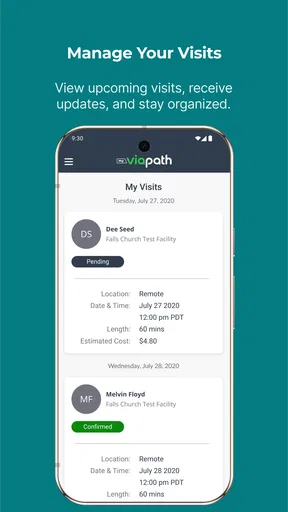
Our Review of GettingOut Visits
 Analysis by Appyee
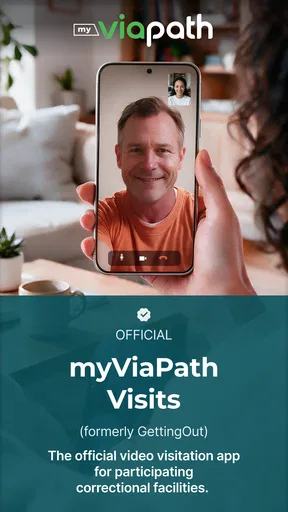
Keeping in touch with someone in a correctional facility is not the same as making an ordinary video call. The service has to fit the facility’s visiting process, the available devices, and the expectations of both people on the call. That is where GettingOut Visits aims to help: it is a communication app from Viapath designed for video visits with loved ones at participating facilities.
I see its main value in the situation it serves rather than in a long list of general messaging tools. If your family member’s facility supports this service, it can give you a more direct way to arrange contact from an Android device. If the facility does not support it, installing the app alone will not turn it into a normal video-chat replacement. That distinction is important, because this is a facility-connected service, not simply another app for calling friends.
The app is free, is rated for Everyone, and has passed the point where it feels like an experimental download. It has more than a million installs and an average rating of 3.3 from roughly twenty-eight thousand ratings, with around twelve thousand written reviews. Those figures suggest a real user base, but they also tell me to approach it with practical expectations: the app is useful to many people, yet the experience can depend heavily on circumstances outside the app itself.
How GettingOut Visits fits into real communication
I find it helpful to think of GettingOut Visits as one part of a planned family routine, rather than the place for every conversation. Once I know the facility supports it, I can keep ordinary updates on the usual channels and reserve this app for the visit itself. That separation makes it easier to prepare the device and focus on the conversation, which is why I’d next look at the small settings that can prevent avoidable interruptions.
Start with the facility, not the download button
The first question I would ask before spending time setting everything up is whether the relevant facility offers video visits through GettingOut Visits. The store summary specifically frames the service around selected facilities, so availability is not universal. This is the most important limitation and the easiest one to overlook when searching for a video-calling app.
In a normal call, both users can usually choose an app and begin. Here, the facility’s participation is part of the basic requirement. That makes the service more specialized than FaceTime, Google Meet, WhatsApp, or similar alternatives. Those apps are better when you simply need an open, general-purpose conversation. GettingOut Visits makes more sense when the call has to fit an established correctional-facility visiting arrangement.
My advice is to confirm the facility’s process first, then install the app and follow the account steps it presents. This avoids a common frustration: creating an account, preparing for a visit, and only later discovering that the intended location uses a different system or has its own scheduling rules.
A realistic family scenario
Imagine a relative has a scheduled opportunity to speak with family, while you are at home with a phone or tablet and a reasonably quiet room. Instead of trying to coordinate an ordinary social video service that the facility may not permit, you use the supported app and prepare for the visit through the channel connected to that facility. The benefit is not that the app replaces every other communication tool; it is that it is designed around this particular kind of contact.
That scenario also reveals the trade-off. You may have less freedom than with a general messenger. The timing, eligibility, or way a visit is arranged can be shaped by facility procedures rather than by your personal preference. I would not judge the app solely by the standards of a casual video-chat service, because its job is narrower and more regulated.
What the current release means for users
The current version is 5.0.0, and the app requires Android 7.0 or later. That makes checking the phone’s Android version a sensible first step, especially if you are helping an older relative install it. A compatible operating system does not guarantee a smooth visit, but an incompatible one prevents the app from being useful at all.
I also like to separate installation questions from visit questions. If the app opens and the account can be prepared, that only confirms that the device can run it. The actual usefulness still depends on the supported facility and the contact process connected to the person you want to reach. Treating those as separate checkpoints makes troubleshooting much less confusing.
Trust begins with visible choices
For a communication app involving sensitive family circumstances, trust should not come from a polished interface or a reassuring slogan. I would look at the permissions requested during setup, the account information the app asks me to enter, and the choices shown before a visit begins. I would also read any privacy and data explanations presented in the app or on its store page rather than assuming that every communication service handles information in the same way.
The important habit is to review each prompt instead of tapping through automatically. If the app asks for access that is clearly needed for a video visit, I can consider that request in context. If a prompt seems unrelated to the task, I would pause and investigate before accepting it. This is a more reliable approach than making broad assumptions about what the app can or cannot access.
I would use a password that is not shared with other services and keep the account recovery details current. That is especially worthwhile when several family members may help manage visits. A unique login reduces the damage if another account is exposed, while current recovery information prevents a preventable lockout before an important conversation.
Account control matters more than convenience
People often focus on camera quality, but account control can matter just as much. Before relying on the app, I would identify where the profile settings, sign-out option, and any support or help route are located. Knowing how to leave an account on a shared device is useful when a phone or tablet belongs to a household rather than to one person.
I would also avoid saving login details on a public or borrowed device. A private family tablet may be convenient, but it still deserves a quick check after the visit: is the account signed out, are notifications visible to other users, and does the device retain information that another person could open? These are small steps, yet they give the user more control over a sensitive communication channel.
When a visit does not work, I would change one variable at a time. First check the internet connection, then confirm that the device is supported, then review the account and facility details. Reinstalling immediately can erase useful context without addressing a facility-side issue. If the problem appears tied to scheduling or eligibility rather than the phone, the facility’s process or the app’s support route is likely more relevant than changing camera settings.
Data-sensitive moments during a video visit
A video visit can expose more than the words being spoken. The camera may show other people in the room, paperwork on a table, a child’s school uniform, a home address on a package, or notifications appearing on the phone. I would choose a neutral background, silence unrelated notifications, and keep documents out of the camera’s view.
Headphones can help in two ways: they make the conversation easier to hear and reduce the chance that nearby people hear private details. They are not essential for every household, but they are a sensible choice when the room is shared. I would also position the device before the visit begins so that I am not repeatedly moving it around while the conversation is underway.
Another useful boundary is to decide who is present before connecting. If children or other relatives are joining, everyone should understand that the call is a structured visit rather than an informal group chat. This avoids accidental interruptions and helps prevent someone from appearing on camera without realizing it. The app may facilitate the connection, but the people using it still control much of the privacy around the conversation.
Notifications and shared devices deserve attention
On a personal phone, incoming messages can appear over the screen or produce sounds during a visit. I would enable a suitable focus or do-not-disturb setting if the device supports it, while checking that the visit itself is not disrupted. Before doing this, I would make sure I understand how the app signals an incoming or active visit, because blocking every notification without checking could create a different problem.
On a shared device, I would inspect the lock-screen notification settings. Even a short preview can reveal that a visit is scheduled or that an account is active. The safest choice depends on the household, but the general principle is simple: show only what other people using the device genuinely need to see.
I would not record or photograph a visit unless the applicable rules clearly allow it and everyone involved understands what is happening. Facility-based communication can have stricter expectations than a private call between friends. Recording also creates an additional copy that must be stored and protected, so convenience is not a good reason to do it casually.
Where this app is stronger than ordinary alternatives
The strongest argument for GettingOut Visits is contextual compatibility. A general video service may offer excellent calling tools, but it cannot by itself make a facility accept that call. When the relevant location supports Viapath’s service, using the designated app can be more practical than trying to persuade both sides to use an unrelated platform.
Its focused purpose can also be easier for a family member who only needs one specific type of contact. They do not necessarily need a social feed, a large messaging ecosystem, or a collection of collaboration features. A dedicated visiting app can reduce the temptation to mix an important family conversation with unrelated chats and alerts.
That advantage comes with less flexibility. If you want spontaneous calls, broad international group meetings, screen sharing, or an app that works with almost anyone, a standard communication platform will usually be a better fit. GettingOut Visits should be chosen because of the facility connection, not because it competes feature for feature with mainstream video-chat products.
Who should use it, and who should skip it
I would recommend trying it to relatives and friends whose loved one is at a participating facility and whose Android device meets the operating-system requirement. It is also a reasonable option for people who prefer a purpose-built route instead of juggling an ordinary video app with separate facility instructions.
I would skip it if the facility does not support the service, if I need unrestricted calls with people outside that system, or if my device cannot run Android 7.0 or later. In those cases, the app is not necessarily poor; it is simply the wrong tool for the job. A broader video service is more suitable for ordinary personal calls, while the facility’s own alternative is more relevant when its rules point elsewhere.
I would also be cautious about recommending it to someone who expects every problem to be solved from inside the app. A visit can be affected by account status, facility procedures, connection quality, device settings, and the other participant’s availability. The app can be part of the solution without controlling every part of the experience.
My practical setup routine
Before the first important visit, I would install the app early rather than minutes before the expected call. I would check the Android version, connect to the intended Wi-Fi or mobile network, review the account prompts, and test the camera and microphone in the device’s normal settings. I would then place the phone where it can remain stable and where the room has enough light for the other person to see me clearly.
I would keep the device charged and close unnecessary apps, not because that guarantees a perfect call, but because it removes simple sources of interruption. I would also prepare a backup communication plan for ordinary family updates, since a specialized visiting app should not be the only way relatives can exchange urgent information.
For families sharing responsibility, writing down the basic account recovery process in a secure place can prevent panic later. I would not leave passwords in an open note or send them through a group chat. Instead, I would make sure the person most likely to manage the visit knows how to find the official help route and how to recognize the correct account.
A measured verdict on trust and usefulness
GettingOut Visits earns my cautious recommendation for a narrow but meaningful purpose. It gives people a way to pursue video contact when their loved one’s facility supports the service, and its free price removes one obvious barrier to trying it. Viapath has built it for a communication situation where compatibility with the facility matters more than having every feature found in a general messenger.
At the same time, I would not treat the app as a universal video-calling solution or assume that installation guarantees access to a visit. The average rating of 3.3 shows that the experience is mixed enough to justify preparation and patience. I would pay attention to the permissions and account choices shown on my own device, protect notifications and shared hardware, and keep the facility’s procedures in view whenever something goes wrong.
My final view is straightforward: if the service is supported where your loved one is held, it is worth examining as the dedicated communication option. If not, choose a platform that matches the facility’s actual process or use a normal video-chat app for contacts that do not involve those restrictions. The right choice depends less on the app’s name than on whether it gives you a legitimate, understandable path to the person you need to reach.
Privacy and Permissions
See what permissions an app requests and how it handles your data.
- Location
- approximate location (network-based), precise location (GPS and network-based)
- Photos/Media/Files
- read the contents of your USB storage, modify or delete the contents of your USB storage
- Storage
- read the contents of your USB storage, modify or delete the contents of your USB storage
- Camera
- take pictures and videos
- Microphone
- record audio
- Other
- view network connections, full network access, change your audio settings, run at startup, control vibration, prevent device from sleeping
Verdict
Strengths of GettingOut Visits
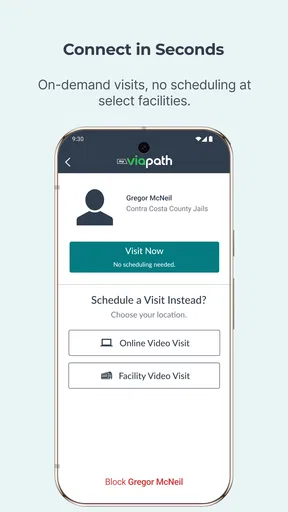
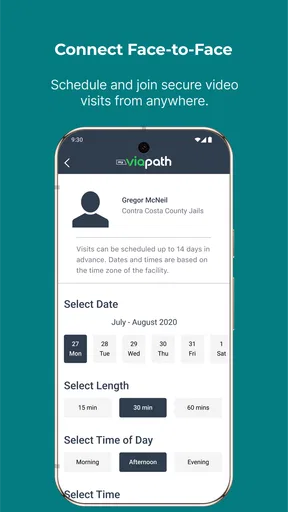
- Video visits can be scheduled from a phone without traveling to the facility.
- The app keeps visit details and facility information in one convenient place.
- Useful notifications can help users remember upcoming scheduled visits.
- Available on mobile devices, making remote contact more accessible for families.
- Supports staying connected when in-person visitation is difficult or unavailable.
Limitations of GettingOut Visits
- Visit availability depends on the correctional facility’s rules and schedule.
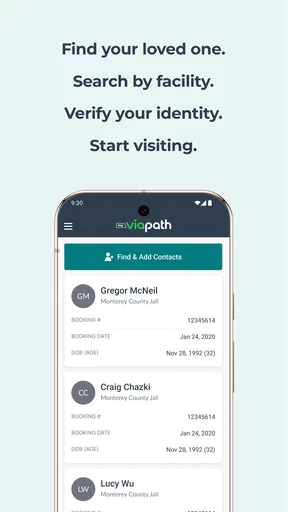
- Users may need to create an account and complete identity verification first.
- Poor internet connections can cause video delays, freezes, or dropped visits.
- Some features or visits may require payment, depending on facility policies.
- App performance and supported services can vary between facilities and devices.
Other Releases by Viapath
View All
GTL | GettingOut
Productivity3.3
Similar Picks in This Category
View All
Google Messages
Google LLC4.6

Gmail
Google LLC4.1

Google Meet
Google LLC4.4

Google Chrome
Google LLC4.1

WhatsApp Messenger
WhatsApp LLC4.6

Carrier Services
Google LLC4.2
Frequently Asked Questions
What is GettingOut Visits, and what can I use it for?
GettingOut Visits is a communication app designed to help approved visitors connect with incarcerated individuals through scheduled video visits. Depending on the facility, it may also provide messaging or other communication features. Availability, visit types, and supported services vary by correctional institution, so you should confirm that the facility you need is supported before creating an account or purchasing a visit.
How do I schedule a visit through GettingOut Visits?
After downloading the app, you generally need to create or sign in to a GettingOut account, locate the participating facility, and follow its visitor approval and scheduling requirements. You may be asked to provide identification details and select an available date and time. Some facilities require advance approval, while others may impose specific booking windows, visitor limits, or appointment rules.
Do video visits in GettingOut Visits cost money?
GettingOut Visits may offer free or paid communication options depending on the correctional facility and the type of visit selected. Fees can vary by location, duration, and service, and additional charges may apply for deposits or account-related transactions. Review the price shown before confirming a booking, because payments and refunds are usually governed by the facility’s policies.
What do I need for a successful video visit?
For a smooth visit, use a reliable internet connection, a compatible Android or iOS device, and allow the app access to your camera and microphone. Choose a quiet, well-lit location and test your equipment beforehand. You should also follow the facility’s dress code, behavior requirements, identification rules, and restrictions on recording or having other people present.
What should I do if my visit does not work or is canceled?
If a visit fails to connect, first check your internet connection, app permissions, device compatibility, and whether the application is updated. Reopening the app or restarting the device may resolve minor issues. If the problem continues, contact GettingOut support and the relevant facility with your account information and appointment details. Cancellation, rescheduling, and refund decisions may depend on the facility’s rules.
